Forever Tongues
Talk to the other faction: see what their garbled chat may mean, say lines they can read, and send coded messages to other Forever Tongues users.
Screenshots
What it does
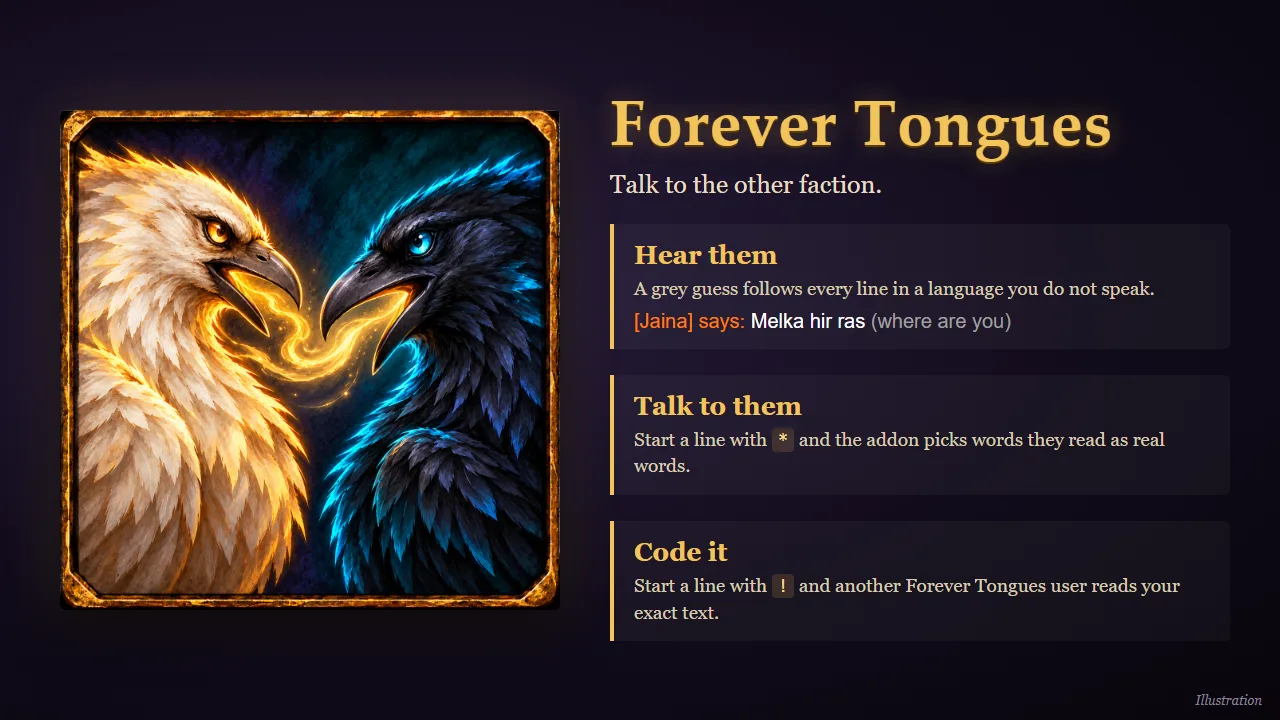
Talk to the other faction. Horde and Alliance cannot read each other's chat: the server turns every word into a fake word of the speaker's language. Forever Tongues works with that garbling instead of against it.
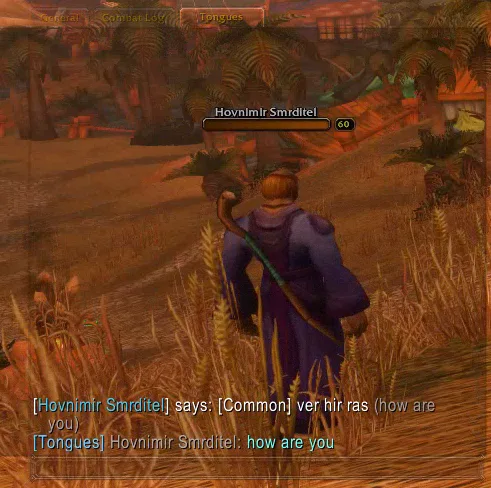
- Hear them. After a say or yell in a language you do not speak, the addon adds a grey guess of what was meant:
Melka hir ras (where are you). - Talk to them. Start a line with
*and the addon picks words that the other faction reads as real words. - Code it. Start a line with
!(or switch the speaking mode to coded) and another Forever Tongues user reads your exact text.
The book
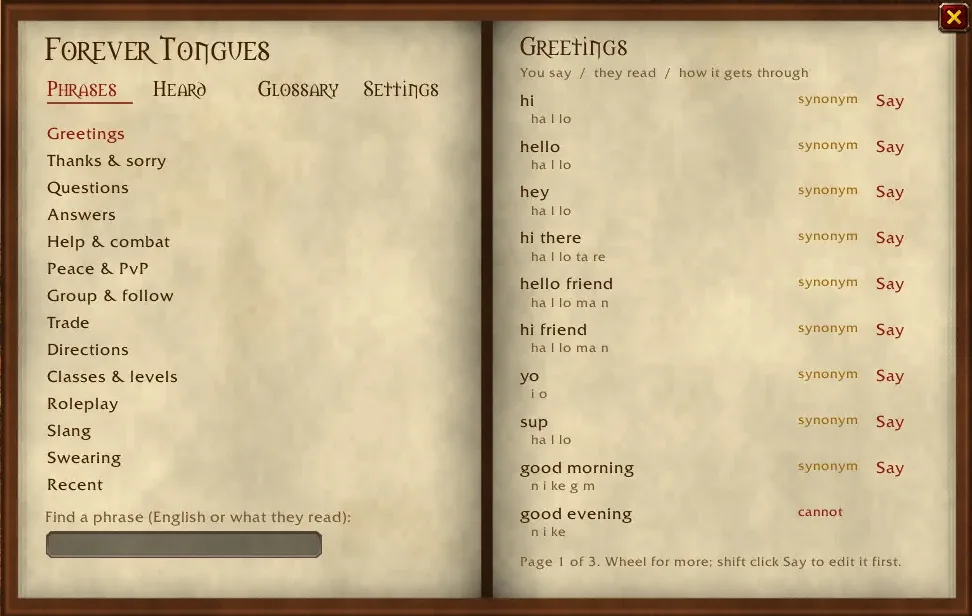
A click on the minimap button opens an old book with parchment pages:
- Phrases – ready-made chat phrases in topics (greetings, help, trade, directions, questing, swearing, ...). Each shows what the other faction will read, whether it gets through whole, and a Say button.
- Heard – the last 40 lines you heard from the other faction, each with the book's guess. Click a word to see what else it may mean, and pick the right one. The book remembers your choice.
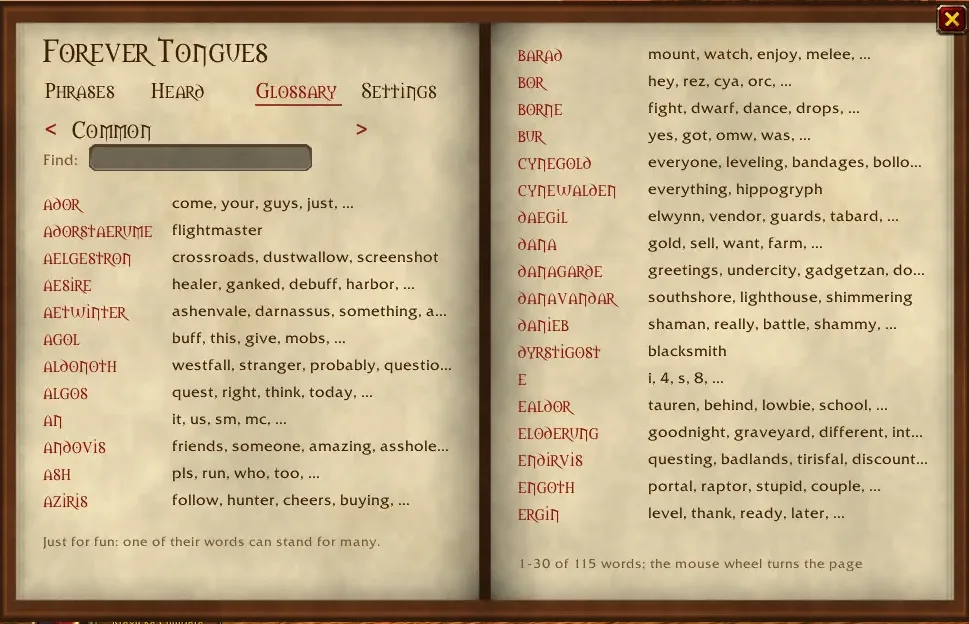
- Glossary – just for fun: their words from A to Z, each with what it may mean. Turn the page to the next language or look up a word.
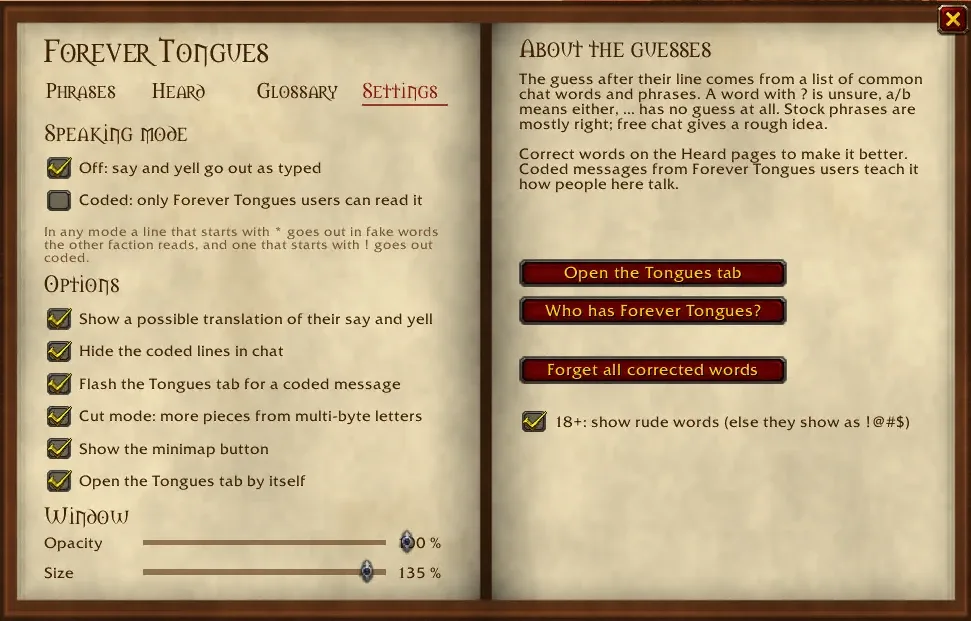
- Settings – the speaking mode, all options, and sliders for the book's opacity and size.
More
- A Tongues chat tab for the cross-faction talk, opened by itself (can be turned off).
- A hint under the chat box while you type: what the other faction will read and which words are left out.
- A sound and a flashing tab when a coded message arrives in another tab.
- An 18+ option: rude words show as
!@#$until you turn it on. - 1,553 chat words and 2,431 phrases in the dictionary.
Commands
/tongues lists all commands. The main ones:
| Command | What it does |
|---|---|
/tongues book |
open or close the book |
/tongues s <text> / y <text> |
say or yell through Tongues |
/tongues p <text> |
preview what the other faction reads |
/tongues mode off \| coded |
speaking mode of the chat box |
/tongues translate on \| off |
the grey guess after their lines |
/tongues adult on \| off |
show rude words (18+) |
/tongues tab [on \| off] |
open the Tongues chat tab |
/tongues options |
settings panel |
Good to know
- The guesses are guesses. Common chat lines are mostly right; free chat gives a rough gist. Words you corrected always win.
- Words are read best for Orcish and Common. Other languages have the dictionary and the glossary, but fewer words get through when you talk.
- Made for the Forever client (Interface 16001); it also loads on the 1.12.1 client.
Changelog
1.11.0 current
Features
- The book has a Help page. It shows how to speak to the other faction, read and correct what they say and talk in secret, with examples to type in chat (
*hello friend,!meet me at the inn), says what each page is for (a click on its name opens it) and explains whole, synonym and cannot on the Phrases pages. It opens by itself the first time you open the book. - The settings and the Settings page of the book have a Help and feedback row with the Forever Addons Discord invite. Click it and press Ctrl+C to copy it; a Discord link beside the book's title and
/tongues discordopen it. - The version shows beside the title of the settings and of the book;
/tongues versionprints it. - The book opens on the page you left it on. On Heard, "Clear the list" (click twice) empties the heard lines, and a line under them counts them.
Changes
- The Settings page of the book has the glossary sharing check box too, and the three buttons of the settings sit in one row.
/tonguesalone lists the commands in four short groups (speak, book, chat, more) instead of one long line.- In the book, every topic shows how many phrases it holds, Recent says what it is for while empty, the glossary counts the words you confirmed, every option has a tooltip, and Escape first empties a search box.
1.10.0
Features
- Words you confirm in the glossary go to Forever Tongues users in your guild and group, and theirs come to you. A shared word never replaces one you confirmed.
/tongues sharesends all of yours,/tongues share offor the check box in the settings stops it. - With Chattynator the Tongues tab flashes when a coded message comes in while another tab is in front.
1.9.4
Bug fixes
- With Chattynator the Tongues tab works again. It is one of Chattynator's special tabs: tick Tongues once in its settings (Customise Chattynator, General, Special tabs); until then decoded lines go to the main chat and the addon says how to turn the tab on.
1.9.3
Changes
- The addon names its CurseForge project, so the CurseForge app can find and update it. New versions are uploaded to CurseForge from a tag.
1.9.2
Bug fixes
- The slider knob on the Settings page no longer covers the value at 100 %.
1.9.1
Changes
- The addon description no longer says it is for local test servers.
1.9.0
Features
- An 18+ check in the book and the settings panel (
/tongues adult on|off, off by default). While it is off, rude words show as !@#$ in the book and in the translation after their line.
1.8.0
Features
- A Glossary page in the book, just for fun: the words of a language you hear garbled (the other faction's first, < > turns to the next language), a to z over both pages, each with what it may mean; words you corrected show in green. Find looks up a garbled word or a meaning.
1.7.3
Changes
- The book and the settings panel no longer have a Send the cut test line button;
/tongues teststill sends it.
1.7.2
Features
- The Tongues tab opens by itself at the first loading screen, or when the book opens if it could not be made then.
/tongues tab off(or the check in the settings) stops it;/tongues tabstill opens it at once.
1.7.1
Features
- The Settings page of the book has sliders for its opacity (30–100 %) and size (60–150 %); both are kept for the next login.
1.7.0
Features
- The dictionary is now a book: an open book with parchment pages and brown ink, opened with a click on the minimap button (
/tongues bookor/tongues dict). Pages: Phrases (topics on the left, phrases with what they read and Say on the right), Heard and Settings (speaking mode and all options). - The Heard pages replace Their words. The left page lists the last 40 lines heard from the other faction, each with the book's guess. The right page shows the chosen line word by word, and a click on a word lists what else it may mean, so you can pick the right word. The book remembers one word per garbled word; picking another replaces it.
- Swear words and insults are in the dictionary (fuck, shit, stfu, gtfo, asshole, ...), with a Swearing topic.
Changes
- The speaking mode is off or coded only; a line that starts with
*goes out in fake words, as before. A saved spell mode counts as off. A right click on the minimap button switches the mode; the game's settings panel stays at/tongues options.
1.6.0
Features
- A dictionary window (
/tongues dict, shift click on the minimap button, or the settings). The Phrases tab lists 12 topics of chat phrases (greetings, help, trade, directions, ...) with what the other faction reads, whether it gets through whole, as a synonym or not at all, and a Say button that sends it through Tongues. The Their words tab lists the fake words heard from the other faction with the words they may stand for; a click confirms one (/tongues learn <fake> <word>,/tongues forget <fake>). - "Show a possible translation" in the settings (
/tongues translate on|off, off by default) adds a grey guess after a say or yell in a language you do not speak, such asMelka hir ras (where are you). The guess comes from 1,498 common chat words and 2,409 phrases; unsure words get?, close callsa/b, unknown words..., and confirmed words always win. Stock phrases are mostly right, free chat gives a rough gist. Not yet checked in game.
1.5.2
Changes
- The hidden hello and
/tongues pingare gone, because the Forever server does not pass them to the other faction; who has Forever Tongues is learned from their coded lines.
1.5.1
Bug fixes
- Your own coded say no longer stays in chat while hiding coded lines is on; in game the client reported it in another language, so it is now recognised by its text.
1.5.0
Features
- A say that starts with
*goes out spelled once, as!codes one line; the hint now shows below the chat box, where it no longer covers the chat. Not yet checked in game.
1.4.0
Features
- A coded message from someone else plays the whisper sound and flashes the Tongues tab when another tab is in front (
/tongues notify on|off). The addon learns who has Forever Tongues from their coded lines and from a hidden hello it sends with every say through Tongues (/tongues ping); the hint above the chat box names them and/tongues wholists them. Whether the hello reaches the other faction on the Forever server is not yet checked in game.
1.3.0
Features
- A speaking mode, so the chat box itself talks to the other faction. A minimap button switches between off, spell (fake words they read) and coded (exact text for Forever Tongues users); right click opens the settings (mode, cut, hide coded lines, minimap button, Tongues tab, cut test). While typing a say, a line above the chat box shows what they will read and which words are left out. A say that starts with
!goes out coded once./tongues mode,/tongues options,/tongues minimap. The settings and the minimap button are on the Forever client only. Not yet checked in game.
1.2.0
Features
/tongues probesays the next test line of multi-byte letters (13 in all, one per command) and/tongues probe recordkeeps what the other faction hears, so the cut mode can be worked out for the Forever client./tongues cut onworks on the Forever client for Orcish and Common, with cut tables built from what the other faction read in game; other languages have no cut mode there yet.- On the Forever client the cut mode is on by default (
/tongues cut offturns it off), and a letter that no fake word of the language has is said as a stand-in letter (helpreadshelbin Common,pricereadsbrik). - The synonym table is English only (84 groups such as
friend bro buddy,wait moment sec); the Czech groups are gone. With cut on, 173 of 215 common chat words get through in Common and 120 in Orcish.
1.1.2
Bug fixes
- On Forever the other faction now reads what ForeverTongues meant in Common and the racial languages, so
/tongues cfrom Alliance to Horde decodes. The Forever client picks the fake word differently from 1.12 (the hash times the language id; Orcish is unchanged), so the addon has its own tables for Forever. Only Common and Orcish are checked in game.
1.1.1
Bug fixes
/tongues c,s,yandpwork on the Forever client again. 1.1.0 stopped with "'string.gfind' was renamed to 'string.gmatch'" because the Forever client keeps an oldstring.gfindthat only raises that error; the addon now usesstring.gmatchwhere it exists.
1.1.0
Features
- A ForeverTongues user no longer sees the coded lines in chat; the message shows as
[Tongues] Name: textin its own colour, in a chat tab named Tongues when there is one./tongues tabopens that tab,/tongues hide offshows the coded lines again. Players without the addon still see the fake words. Not yet checked in game.
Help and feedback
Questions, bugs and ideas are welcome on the Forever Addons Discord: #help for setting it up, #bug-reports when something is broken (the addon version and the error text help a lot), #feature-requests for ideas.