
Forever Rumble
Your controller tells you what happens in combat: vibrations and DualSense light bar colours for procs, lit abilities, low health, enemy casts and stuns. Every class. Experimental.
Screenshots
What it does
Your controller tells you what happens in combat. Playing WoW Forever on a gamepad, you feel a proc, a lit ability or an enemy cast in your hands, and a DualSense shows it on its light bar, so your eyes can stay on the fight.
Experimental (beta). This is an early version, not yet tested with every class and controller. Signals may fire too often or not at all in some situations. Please tell us on Discord what you feel, and what you don't.
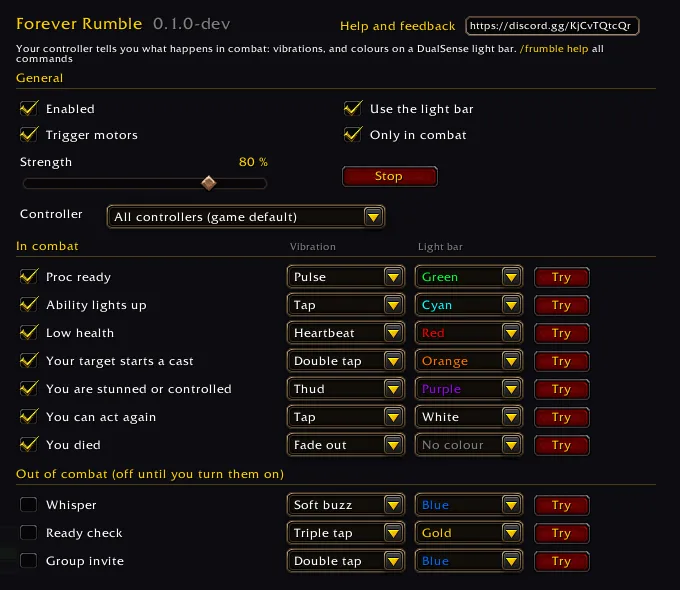
- For every class. Any proc the game shows around your character (Maelstrom Weapon at 5 stacks for a shaman) and any ability the game lights up on your bars (Execute, Revenge, Overpower and the like).
- Combat signals: low health, an enemy target starting a cast (time to interrupt), a stun or other loss of control, the moment you can act again, and death.
- DualSense light bar: green while a proc waits, cyan for a lit ability, blinking red at low health, an orange flash for an enemy cast, purple while you are stunned. Every colour is your choice, or none.
- Your feel: each signal has its own switch, a dropdown for how it vibrates (pulse, tap, double tap, heartbeat, thud and more) and a Try button. Strength and trigger motors (Xbox controllers) are settings.
- Several controllers? The Controller dropdown picks the one the game uses, so the pad in your hands is the one that rumbles.
- Whisper, ready check and group invite signals are there too, off until you turn them on.
How to use it
- Connect your controller and turn on gamepad mode in the game.
- Type
/frumbleand press Try next to a signal to feel it. - Switch off what you don't want and pick your own vibrations and colours.
Commands
| Command | What it does |
|---|---|
/frumble |
open the settings |
/frumble on, /frumble off |
every vibration and the light bar |
/frumble try proc |
plays a signal: proc, glow, lowhealth, cast, cc, free, death, whisper, ready, invite |
/frumble stop |
stops the vibration and gives the light bar back to the game |
/frumble strength 80 |
strength in per cent |
/frumble color proc green |
light bar colour: off, red, orange, gold, yellow, green, cyan, blue, purple, pink, white |
/frumble light on, /frumble light off |
the DualSense light bar |
/frumble info |
the controllers the game sees |
/frumble use 2, /frumble use all |
the game uses controller 2 only, or every controller |
/frumble help |
all commands |
Good to know
- Only WoW Forever. The addon uses the game's own gamepad API; it reads no combat log.
- A DualSense has no trigger motors, so trigger taps are felt only on Xbox controllers. The light bar is DualSense only.
- Procs, lit abilities and enemy casts signal only in combat by default; "Only in combat" in the settings changes that.
- Choosing a controller changes the game's own setting
GamePadSingleActiveID, so it also decides which pad plays. It can't be changed in combat.
Changelog
0.1.0 current
Features
- Experimental (beta), not yet tested with every class and controller; feedback on Discord is welcome. A new addon, Forever Rumble, that lets your controller tell you what happens in combat, for every class. A proc the game shows around your character (Maelstrom Weapon at 5 stacks for a shaman) gives a short strong pulse and turns a DualSense light bar green until you spend it; a button the game lights up (Execute, Revenge, Overpower and the like) taps and holds the bar cyan; low health (the game's red warning) beats like a heart with a blinking red bar; an enemy target starting a cast taps twice with an orange flash, so you can Earth Shock it; a stun or other loss of control thuds and holds the bar purple, and a sharp tap with a white flash says you can act again; death fades out. Xbox controllers also feel taps in the triggers. Every signal has its own switch, a dropdown for how it vibrates, a dropdown for its light bar colour (or none) and a Try button; strength, the light bar, trigger motors and "Only in combat" are settings. Whisper, ready check and group invite signals are there too, off until you turn them on. With several controllers connected, a "Controller" dropdown (or
/frumble use 2,/frumble use all) picks the one the game uses, so the pad in your hands is the one that rumbles./frumble, the Forever Addons Discord link in the settings.
Help and feedback
Questions, bugs and ideas are welcome on the Forever Addons Discord: #help for setting it up, #bug-reports when something is broken (the addon version and the error text help a lot), #feature-requests for ideas.