Forever Mounts
Every mount in WoW Forever in 3D, also the ones you do not have yet: turn and zoom it, see yourself on it, and learn where to get it and who it is for.
Screenshots
What it does
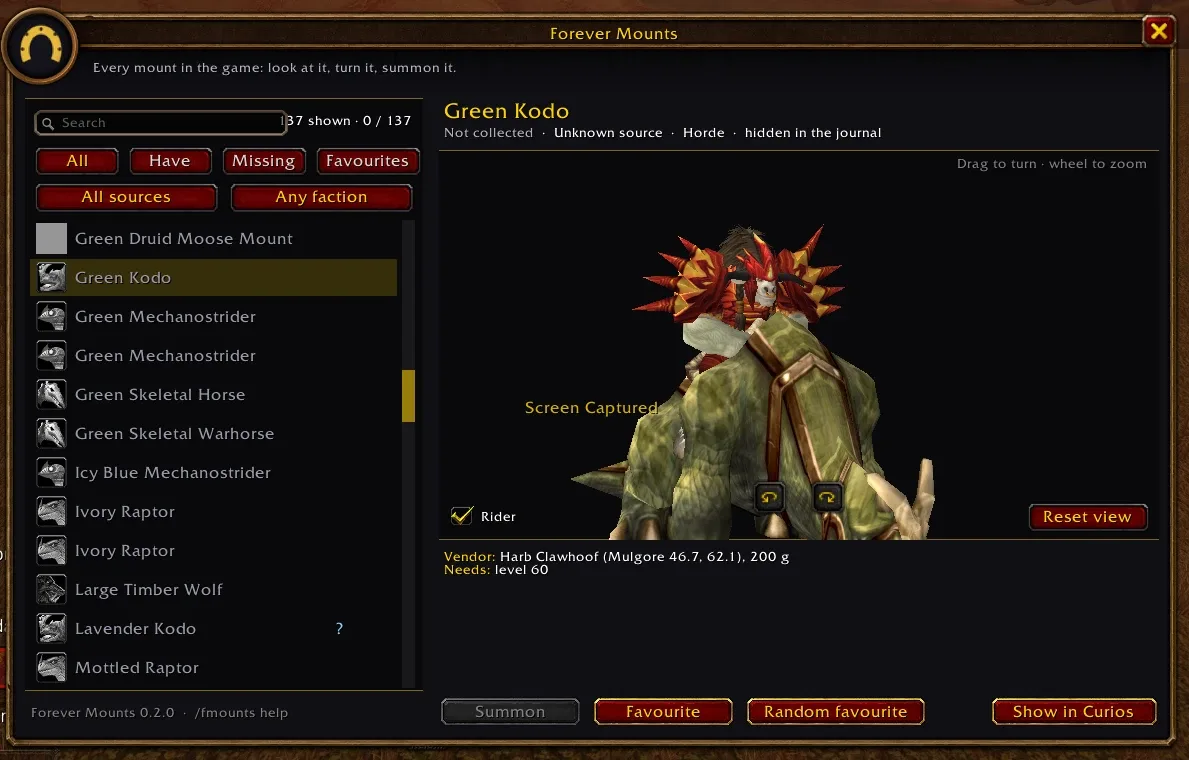
Every mount in WoW Forever, in 3D, and how to get it. Forever Mounts is a mount viewer in one window. It shows every mount in the game's mount journal: the ones you have, the ones you are missing, and the other faction's ones.
- Look at it properly. The 3D model, as in the mount journal. Drag it to turn it, use the wheel to zoom, and tick Rider to see your own character on it.
- How to get it. The vendor with zone and coordinates and the price, for example Vendor: Harb Clawhoof
(Mulgore 46.7, 62.1), 200 g, or the creature that drops it, or the quest and who gives it. The search finds
vendors and zones too, so
orgrimmarlists the mounts sold there. - Who it is for. Horde or Alliance, the level it needs, and who the vendor sells to, for example sells to Tauren, or Exalted with Thunder Bluff.
- Find it fast. A search, the filters All, Have, Missing and Favourites, and buttons for the source and the faction.
- Ride it. Summon or dismount the selected mount, star your favourites and summon a random favourite.
- Don't miss out. Mounts that can be missed get a
!and a note. - Tooltips. Hover over a mount in the list to see its tooltip and how to get it.
- Forever Curios. If you also use Forever Curios, Show in Curios opens the mount there, with its map.
Commands
| Command | What it does |
|---|---|
/fmounts |
open or close the window (or click the minimap button) |
/fmounts <text> |
open it with a search |
/fmounts random |
summon a random favourite |
/fmounts rider on \| off |
show your character on the model |
/fmounts minimap on \| off |
show or hide the minimap button |
/fmounts size <70-150> |
window size |
/fmounts opacity <30-100> |
window opacity |
/fmounts options |
open the settings |
Good to know
- Made for the Forever client (Interface 16001).
- How to get a mount comes from Wowhead's Forever database and from the Classic data of the vendors, drops and quests. Some mounts have no known source on Forever yet. If something is wrong, please tell me in the comments.
- Favourites are saved per account.
Changelog
0.2.2 current
Features
- First release on CurseForge. Every mount in the game in 3D: search, filters (have, missing, favourites, source, faction), turn and zoom the model, see it with you on it, summon it, favourites, how to get each one (vendor with the spot, drop, quest) and who it is for (faction, race, reputation), and a Show in Curios button.
- A new icon, a painted horse in armour, in the AddOns list, on the minimap button and as a sharp portrait in the window.
0.2.1
Features
- The guide says who a mount is for: Horde or Alliance under Needs, and who a vendor sells to, for example
sells to Tauren, or Exalted with Thunder Blufffor the Green Kodo orExalted with Wintersaber Trainersfor the Winterspring Frostsaber, in orange.
0.2.0
Features
- Under the model, how to get the mount (vendor with zone and spot, drop, quest, what it needs), for 112 of the 144 mounts; the search also finds vendors and zones (
orgrimmar). - Hovering a mount in the list shows its mount tooltip with how to get it; the list has a scroll bar; Show in Curios opens the mount in Forever Curios when it is installed.
Bug fixes
- A mount with no source type showed "Source 0"; it now says "Unknown source".
0.1.0
Features
- Drag the model to turn it, use the wheel to zoom, the arrows turn it too, Reset view goes back; the Rider box shows your character on the mount.
- Summon (or Dismount) the selected mount, star your favourites (kept for all characters) and summon a random favourite (
/fmounts random). Settings: minimap button, rider, window size 70–150 % and opacity 30–100 % (/fmounts size,/fmounts opacity).
Help and feedback
Questions, bugs and ideas are welcome on the Forever Addons Discord: #help for setting it up, #bug-reports when something is broken (the addon version and the error text help a lot), #feature-requests for ideas.