
Forever Console
A command console like a terminal: suggestions as you type, Tab completion, help, history, aliases, a Lua inspector and copyable output.
Screenshots
What it does
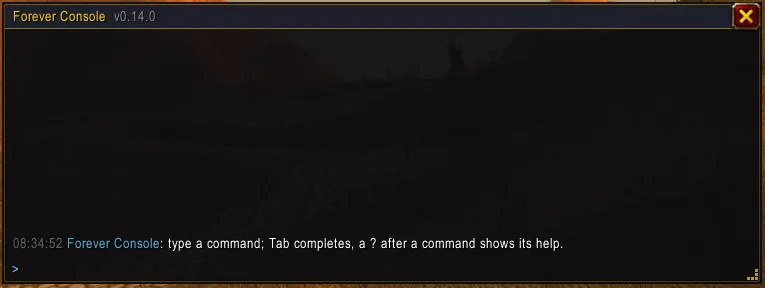
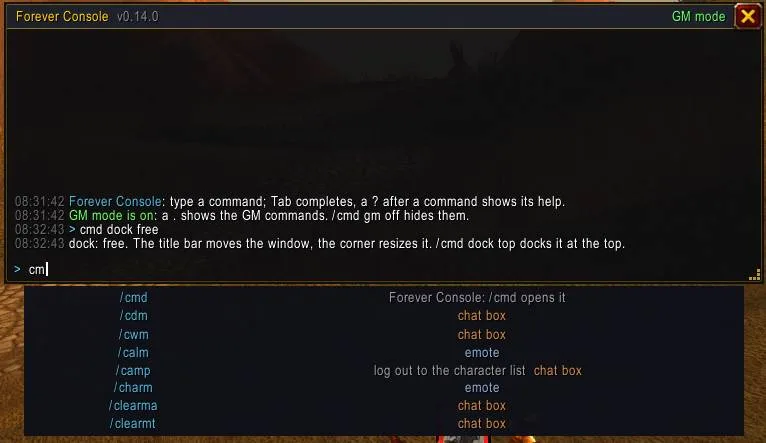
Type commands like in a terminal. Forever Console is a console window that slides down from the top of the screen when you press its key. It knows every slash command of the game and of your addons. It suggests them as you type, completes them with Tab, shows their help and remembers everything you ran.
- Suggestions as you type. Commands, emotes and addon options show as you type. Player names are suggested for
/w,/inviteand the like. Tab or a click takes the highlighted row. - Help on the spot:
<command> ?explains a command, and/cmd help <command>does the same. - History. Up/Down walk your history, and
!textor Ctrl+R searches it. Lines you type in the normal chat box are kept too. A line that looks like a password is never stored. - Commands run in the console. Say, yell, whispers (
/w,/r), party, guild, raid, channels (/2 text),/afk,/reload,/roll,/who,/inviteand addon commands all run on Enter, and their output stays in the console. The few commands the game allows only from the chat box (/cast,/use,/target) are handed to the chat box, and the console tells you why.
Power tools
- Several commands on one line:
/s hi; /wave; /rollruns them in order on one Enter. - Aliases:
/cmd alias gg = /s good game; /cheerturnsgginto a command. - Favourites:
/cmd favstars a line, and starred lines come first in the history and the suggestions. - Find and filter the output:
/cmd find <text>, and/cmd filter console|reply|chat. - Lua inspector:
= UnitName("target")or= C_Mapshows what an expression gives. A table shows as a link: a click lists its keys, 40 at a time, and the tables inside open with a click too. Names and fields are suggested while you type. - Copy the output:
/cmd copy(or/cmd copy 20for the last 20 lines) opens a box with the text selected. Press Ctrl+C to copy it, for example an error or a long reply.
Make it yours
- A minimap button: a click opens the console, a right click opens the settings, and you can drag it around the minimap.
- Settings in Options → AddOns → Forever Console (or
/cmd options) for everything below, with check boxes and sliders. - Docked at the top edge (the default), or a free window you can drag and resize (
/cmd dock top|free). - Size, scale, opacity, font size and time stamps:
/cmd size,/cmd scale,/cmd opacity,/cmd font,/cmd time. - Its own key binding (Key Bindings → Forever Console, or
/cmd key F12).
For private servers with GM rights
/cmd gm on adds the server's GM commands to the suggestions, with their help. A . lists them: .lookup,
.additem, .learn, .tele, .modify and more. The server's replies show in the console. A click on a .lookup
result fills in the matching command, and nothing is sent until you press Enter. /cmd mark <name> and
/cmd go <name> save places and teleport back to them. On a normal realm, GM mode stays off and you never see any of
this.
Commands
| Command | What it does |
|---|---|
/cmd |
open or close the console |
/cmd help [command] |
the list of commands, or the help of one |
/cmd key <key> |
the key that opens the console |
/cmd clear / /cmd history |
clear the output / list the history |
/cmd dock top \| free |
docked at the top or a free window |
/cmd size <w> <h>, /cmd width <n>, /cmd height <n> |
window size (or drag the bottom-right corner) |
/cmd scale <60-150> / /cmd opacity <0-100> / /cmd font <8-24> |
scale, background and font size |
/cmd time on \| off |
time stamps on the output lines |
/cmd options |
open the settings |
/cmd minimap on \| off |
show or hide the minimap button |
/cmd echo console \| chat \| both |
where the output of a command run from the console goes |
/cmd alias <name> = <line> / /cmd unalias <name> |
aliases |
/cmd fav [line] / /cmd unfav [line] / /cmd favs |
favourites |
/cmd find <text> / /cmd filter console \| reply \| chat \| off |
show only some of the output |
/cmd copy [n] |
the output in a box to copy with Ctrl+C |
= <Lua> |
show the value of a Lua expression |
/cmd capture on \| off |
keep the lines typed in the chat box in the history |
/cmd reset |
put the window back where it started |
Good to know
- Made for the Forever client (Interface 16001). It also loads on the 1.12.1 client.
- Works well with Forever Tongues: a say or yell typed in the console shows what the other faction will read.
- Everything is saved per account.
Changelog
0.15.0 current
Features
- Saved commands. A narrow strip under the title bar holds an icon per command, and a click runs it. The
+or/cmd pinsaves a line with a name and an icon from the spellbook or the macro icons; a right click edits, moves or deletes it. Out of combat/cast,/useand/targetrun from the click; in combat they go to the chat box, where Enter runs them.
0.14.0
Features
- A minimap button: a click opens or closes the console, a right click opens the settings, dragging moves it around the minimap.
/cmd minimap on|offshows or hides it. - A settings panel (Options → AddOns → Forever Console, a right click on the minimap button, or
/cmd options) with check boxes for the dock, time stamps, the minimap button, chat capture, GM mode and the echo, and sliders for opacity, scale and font size.
0.13.1
Bug fixes
- The suggestions no longer tag
/s,/w,/roll,/reload, channel numbers and the other commands the console now runs itself as "chat box", and/cmd helpsays they run here; only commands that really go to the chat box keep the tag.
0.13.0
Features
- A line that starts with
=shows what a Lua expression gives (= UnitName("target"),= Foxie). A table shows as a link that lists its keys when clicked, 40 at a time; names and fields are suggested while you type. /cmd copy [n]puts the last n output lines (all by default) into a box with the text selected, so Ctrl+C copies it.
Bug fixes
- Enter in the console no longer just opens the chat box for
/s,/y,/w,/r,/g,/p, channel numbers,/afk,/reload,/roll,/who,/inviteand similar; they run from the console. Commands the game allows only from the chat box (/cast,/use, ...) still go there, and the console says why. Not yet checked in game.
0.12.4
Changes
/tongues adult on|offis suggested.
0.12.3
Changes
/tongues tabsuggests on and off.
0.12.2
Changes
/tongues modesuggests off and coded, and/tongues bookis suggested.
0.12.1
Features
/tonguesalso suggestsdict,translate on|off,learnandforget.
0.12.0
Features
- With Forever Tongues loaded, a say or yell typed in the console (
/s,/y, and/tongues s|y|p|c) shows the Tongues hint as the first suggestion row: the speaking mode and what the other faction will read. The line still goes to the chat box, so the speaking mode and the!and*prefixes apply there./tonguesnow suggests all its current commands (mode off|spell|coded,who,notify,hide,options,tab, ...). Not yet checked in game.
0.11.0
Features
- On the Forever client GM mode can be turned on with
/cmd gm onfor the local Forever server, and a.suggests that server's commands with help:.learn my trainer(every class spell),.learn my quests,.learn all languages,.cheat taxi|god|cooldown|casttime,.additem set,.modify speed walk|swim|fly,.go creature idand more. The 1.12 client keeps the CMaNGOS list. Not yet checked in game.
0.10.1
Bug fixes
- Loads again in the 1.12 client. 0.10.0 stopped with "too many upvalues" (Console.lua:763) because the window builder used more than the 32 outer variables Lua 5.0 allows; it is split into smaller parts, and a test now checks every addon file against the Lua 5.0 limits.
0.10.0
Features
- GM saved places.
/cmd mark <name>asks the server.gpsand keeps the map and coordinates,/cmd go <name>sends.go xyzback there, and/cmd marksand/cmd unmark <name>list and remove them. A click on a.lookupresult (item, item set, spell, quest, creature, teleport) puts.additem,.additemset,.learn,.quest add,.npc addor.telewith it into the input line; nothing is sent until you press Enter.
0.9.0
Features
/cmd find <text>shows only the output lines that contain the text, with the match in yellow;/cmd filter console|reply|chatshows only the console's own lines, the server's replies or what commands printed to chat. Both work together, the title bar says what is filtered, and/cmd filter off(or/cmd findalone) shows everything again.
0.8.0
Features
- Favourites.
/cmd favstars the last line (or/cmd fav <line>),/cmd unfavremoves the star, and/cmd favslists the favourites. A click on the*of a history row toggles it. Favourites come first in the history search, and in the suggestions when they start with what you typed.
0.7.0
Features
;puts several commands on one line, run in order on the one Enter (\;for a literal;)./cmd alias <name> = <line>names a line: typing the name (plus extra words) runs it./cmd aliaslists the aliases,/cmd unalias <name>removes one, and aliases show in the suggestions.
0.6.0
Features
- The console is docked at the top by default. It is as wide as the screen and slides down from the top edge when its key opens it, then back up when closed.
/cmd dock freekeeps the movable window instead, and/cmd dock topdocks it again.
0.5.0
Features
/cmd opacity <0-100>sets the background,/cmd font <8-24>|defaultthe size of the output and the input line, and output lines carry a dim HH:MM:SS time stamp (/cmd time on|off, on by default); all three are remembered and suggested.
0.4.0
Features
- The window resizes by dragging its bottom-right corner or with
/cmd size <width> <height>,/cmd width <n>and/cmd height <n>(with suggestions); the size is remembered, stays within limits and on the screen, and/cmd resetrestores size and position. A taller window shows more output lines, a wider one a wider suggestion list.
0.3.0
Features
- The output of a command run from the console, and the server's reply to a dot command sent from it, show only in the console;
/cmd echo console|chat|bothchanges that (default console). Commands typed in the chat box keep their output in chat.
0.2.4
Bug fixes
- A history line recalled by the 1.12 edit box itself also stays in history mode, so Up, Up, Up, Down keep walking the history and no suggestion list opens.
0.2.3
Bug fixes
- On an empty line Up/Down walk the command history again, and a recalled line stays in history mode in the 1.12 client instead of switching to suggestions; typing or Tab ends the walk.
0.2.2
Bug fixes
/cmd gmand/cmd capturesuggeston/off; Up/Down in any argument list (.learn,.lookup,/cmd gm) only move the highlight and Tab takes it, as for commands.
0.2.1
Bug fixes
- Up/Down only move the highlight in the suggestion list, so the typed text and the list stay; Tab, Enter or a click takes the highlighted command (Enter on a highlighted history line runs it). With no list open, Up/Down still walk the history. Emote rows say "emote" once.
Help and feedback
Questions, bugs and ideas are welcome on the Forever Addons Discord: #help for setting it up, #bug-reports when something is broken (the addon version and the error text help a lot), #feature-requests for ideas.