

Forever Chat
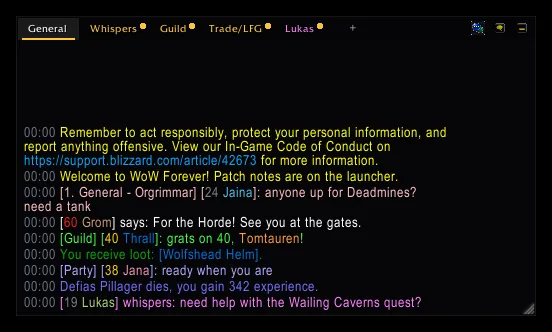
A modern chat window for WoW Forever: tabs you can drag, whispers like a messenger, player levels, command suggestions, bubbles while hidden, and filters for gold spam and repeated lines.
Screenshots
What it does
A quieter, modern chat for WoW Forever. One dark, clean window in place of the game's chat windows, with a tab for everyone who whispers you, and a filter that hides gold spam and repeated lines while it keeps what matters to you.
- Tabs: General, Whispers, Guild and Trade/LFG to start with. Right-click a tab to choose what it shows, rename it,
move it or close it;
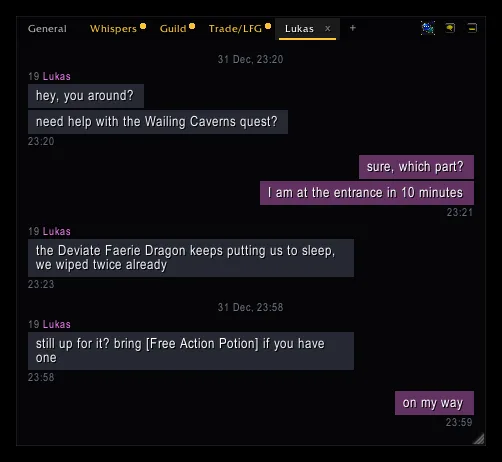
+adds one. Drag a tab along the bar to put it where you want it. - Whispers like a messenger. Everyone who whispers you gets a tab: click it and you are typing to them. The tab shows the talk as bubbles: their lines on the left under their name, yours on the right. Lines sent close together share one time, a longer pause gets a time in the middle. A gold dot shows new talk on a tab you are not looking at.
- Player levels in front of names (
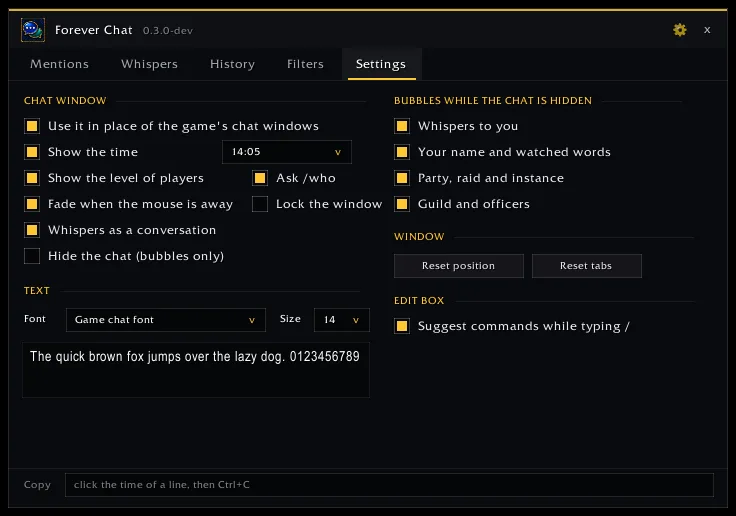
[60 Thrall]), coloured like quest difficulty, for your group, guild, friends,/whoresults, name plates and players you target or point at. Strangers are looked up with a quiet/who, one per key press out of combat, and the answer stays out of your chat. - Your time format: 14:05, 14:05:09, 2:05 PM or 2:05:09 PM, or no time at all. Click the time of a line to copy it.
- Command suggestions. Type
/and a list shows the matching commands with a short help; Up/Down or Tab picks one. With Forever Console loaded it knows its whole catalogue. - Your font and size, with a preview: the game's chat font, Friz Quadrata, Arial Narrow, Morpheus, Skurri, and every LibSharedMedia font another addon brings.
- The combat log on a tab of the same window.
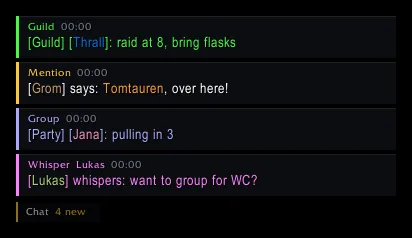
- Hide the chat completely (a button, a key binding or
/fchat quiet): whispers, your name, party/raid and guild lines then come up as small bubbles at the bottom left that fade away. Click one to open the chat on that tab and reply. - Fades when the mouse is away; the text stays. The last 300 lines come back after a relog.
Less spam, nothing missed
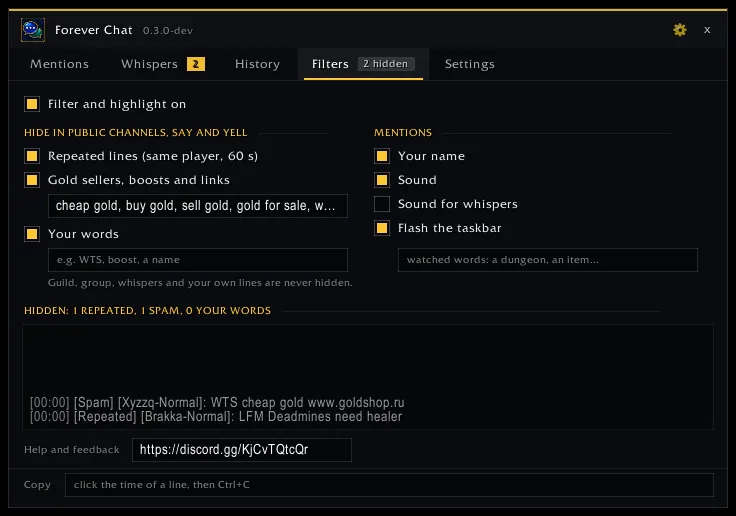
- In public channels, Say and Yell it hides the same line posted again by the same player within a minute, gold sellers, boosts and web addresses, and words you add. Guild, group, whispers and your own lines are never hidden, and the Filters tab lists what was hidden and why.
- Your name and words you watch are coloured, play a sound, flash the taskbar and collect on the Mentions tab.
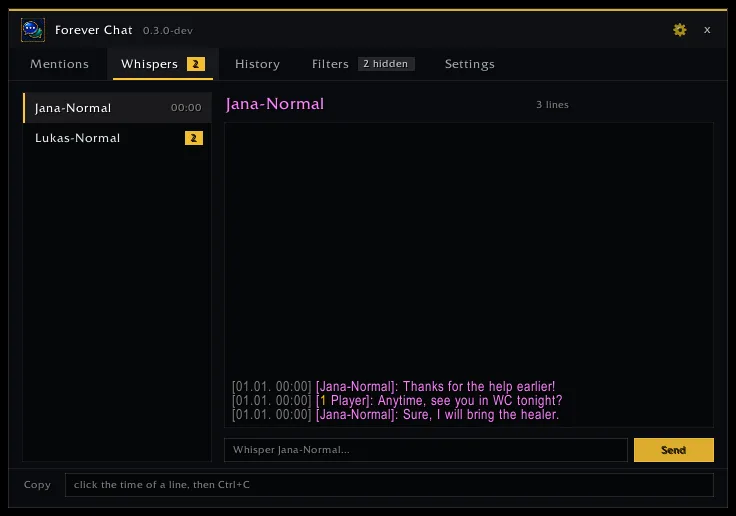
- Whispers are kept as conversations with a reply box, Battle.net whispers too.
- History keeps the last 2000 lines across sessions, with search and channel buttons.
How to use it
- Install it and log in: the Forever Chatbox window takes the place of the game's chat at the bottom left.
- Drag the empty part of the tab bar (or Alt+drag a tab) to move the window, the corner to resize it.
- The gear opens the Settings tab: time format, levels, font and size, fading, bubbles, command suggestions.
Commands
| Command | What it does |
|---|---|
/fchat |
opens the overview window (unread whispers or mentions first) |
/fchat mentions, whispers, history, filters, settings |
opens that tab |
/fchat search <text> |
the history with that text |
/fchat hide <word>, /fchat unhide <word> |
your words that hide a public line |
/fchat watch <word>, /fchat unwatch <word> |
watched words that count as a mention |
/fchat on, /fchat off |
filter and highlight |
/fchat quiet |
hides or shows the chat window (bubbles while hidden) |
/fchat chat on, /fchat chat off |
the Forever Chatbox window in place of the game's (after /reload) |
/fchat reset |
puts the chat window back at the bottom left |
/fchat log |
the combat log tab |
/fchat minimap |
shows or hides the minimap button |
Good to know
- Made for WoW Forever.
- With Chattynator or another chat window addon on, Forever Chatbox leaves the chat window to it and says so; the filters,
mentions, whispers and history still work.
/fchat chat offgives the game's chat back. - Works with Forever Tongues and Forever Console.
Changelog
0.3.0 current
Features
- Whispers read like a messenger. A person's tab shows the talk as bubbles: their lines on the left under their name (with the level when it is known), yours on the right in the whisper colour. Lines sent close together share one name and one time; after a longer pause a time stands in the middle, and away or offline notes sit centred. Links in a bubble show their tooltip and work on click. "Whispers as a conversation" in the window menu or on the Settings tab switches back to plain lines.
Bug fixes
- More players show their level in front of the name: Forever Chat also learns it from name plates around you, from whom your group targets and from short /who answers, and a name written in another case finds its level. Players nobody has seen yet are looked up with a quiet /who: a key you press out of combat sends one for one name, at most one every 5 seconds, and its answer stays out of the chat (the game lets addons use /who only during a key press). Your own /who pauses it; "Ask /who" on the Settings tab turns it off.
0.2.0
Features
- Drag a tab along the tab bar to move it, or use Move left / Move right in its right-click menu. The window now moves by dragging the empty tab bar or Alt+dragging a tab.
- All chat settings on a new Settings tab of the Forever Chat window (the gear, the chat menu or
/fchat settings), with drop-downs for the time format, the font (the game's fonts and LibSharedMedia fonts) and the font size, and a preview. The combat log opens on its own tab of the chat window. Typing/in the edit box suggests the matching commands with a short help, like Forever Console (its whole catalogue when it is loaded); Up/Down or Tab/Shift+Tab choose one. An empty edit box you are not typing in stays invisible, also after login and /reload. - Choose how the time of a line looks: 14:05, 14:05:09, 2:05 PM or 2:05:09 PM (window menu, Time format, or the Settings tab). The level of a player shows in front of the name, coloured like quest difficulty, for your group, guild, friends, /who results and players you target or point at; a setting turns it off.
- The overview window (Mentions, Whispers, History, Filters) has the same dark, flat look as the chat window: a slim title bar with a settings button, tabs with a gold count, people on the left of Whispers with the time of the last line, a reply field with a gold Send button, search with a hint, and flat check boxes. A new painted icon: two speech bubbles in bronze rims.
- Forever Chat replaces the game's chat windows with one dark, modern window. Tabs General, Whispers, Guild and Trade/LFG; right-click a tab to choose what it shows, rename or close it, and
+adds one. Everyone who whispers you gets a tab: click it and you are typing to them, the x closes it. New talk on a tab you are not looking at shows a gold dot. Drag the empty tab bar to move the window, the corner to resize it; the background and tabs fade out when the mouse is away and the text stays. Every line starts with its time (click it to copy the line), web addresses can be copied, and the last 300 lines come back after a relog. The game's edit box sits under the window and takes the colour of the channel you type in; the combat log opens from the menu. The hide button (or/fchat quiet, or a key binding) hides the chat completely: whispers, your name, party/raid and guild lines then come up as small bubbles at the bottom left that fade away; click one to open the chat on that tab and reply. With Chattynator or another chat window addon on, Forever Chat leaves the chat to it and says so;/fchat chat offgives the game's chat back. The overview window from 0.1.0 stays.
0.1.0
Features
- A new addon, Forever Chat, that makes the chat quieter and keeps what matters. In public channels, Say and Yell it hides the same line posted again by the same player within a minute, gold sellers, boosts and web addresses, and words you add; guild, group, whispers and your own lines are never hidden, and the Filters tab lists what was hidden and why. Your name and words you watch are coloured in the chat, play a sound and flash the taskbar, and the lines collect on the Mentions tab. Whispers are kept as conversations with a reply box, Battle.net whispers too. The History tab keeps the last 2000 lines across sessions, with search and channel buttons; click the time of a line to copy it.
/fchator the minimap button (with the unread count) opens the window where something waits;/fchat hide WTS,/fchat watch Deadmines. Works with Chattynator and Forever Tongues. The Forever Addons Discord link is on the Filters tab.
Help and feedback
Questions, bugs and ideas are welcome on the Forever Addons Discord: #help for setting it up, #bug-reports when something is broken (the addon version and the error text help a lot), #feature-requests for ideas.