Forever Action Rings
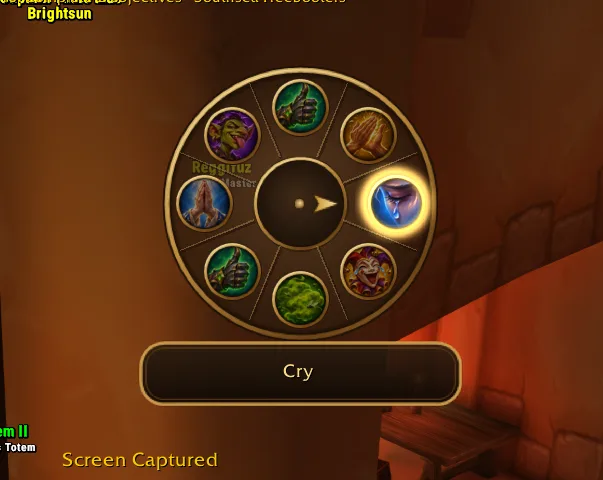
Rings of actions on a held key: hold it, point at a spell, item, toy, mount, macro or emote and let go. Works in combat, with mouse or gamepad.
Screenshots
What it does
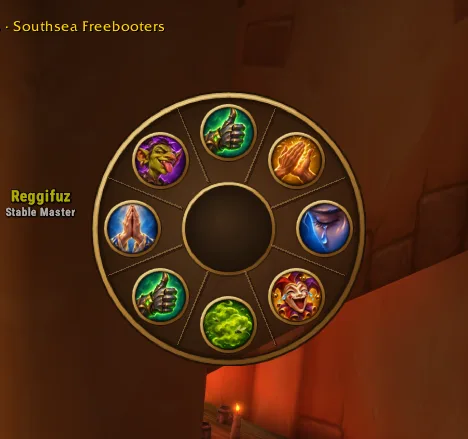
Your spells in a ring, one key away. Hold a key and a ring of actions opens around the mouse. Point at one and let go, and it is used: a spell, an item, a toy, a mount, a macro or an emote. It works in combat, because the ring casts through the game's secure buttons.
- Up to 10 rings, each with up to 12 slots and its own key.
- Spells, items, toys, mounts, macros and emotes. Emotes get their own painted icons, one for each kind of emote (waves, laughs, battle cries, …).
- Mouse or gamepad. Every ring has a mouse key and a gamepad key; with the gamepad you aim with the right stick.
- Each ring its own look. A name shown under the ring, a size from 60 to 160 % and a disc opacity that leaves the icons on it solid.
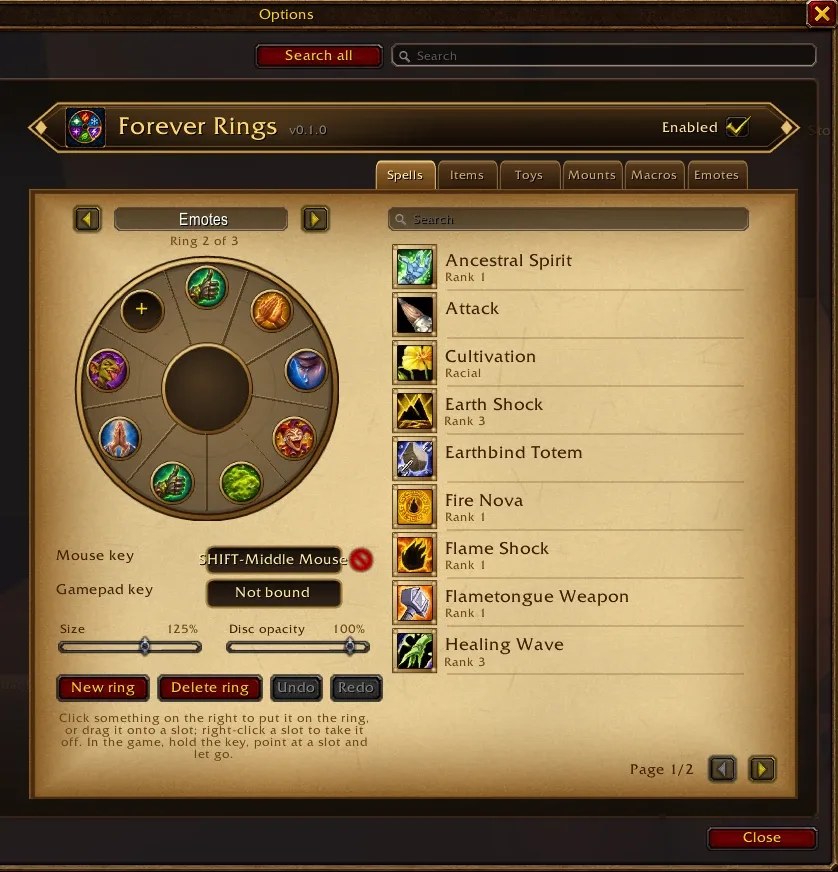
- Easy to set up. Click something in the list to put it on the ring, drag it onto a slot, drag slots onto each other to reorder them, drag one off or right-click it to take it away. Undo and Redo (Ctrl+Z, Ctrl+Y) take back any change.
- Its own art: a light bronze ring with spokes, a needle that points at your choice and its name on a plate under the ring.
How to use it
- Type
/frings(or open Options → AddOns → Forever Action Rings). - Put a few spells on the ring and give it a key, such as Shift + middle mouse button.
- In the game, hold the key, point at a slot and let go. Let go in the middle to use nothing.
Commands
| Command | What it does |
|---|---|
/frings |
open the settings |
/frings on, /frings off |
turn every ring on or off; their keys do what they did before |
/frings list |
list the rings with their keys and slots |
Good to know
- Rings are saved per character, because spells differ per character.
- Keys and slots cannot be changed in combat; changes made then apply when the fight is over.
- A macro slot runs a macro by its name. A renamed or deleted macro leaves a slot that does nothing.
Changelog
0.2.0 current
Features
- Ready-made rings. New ring offers an empty ring or one of three: Game menu (Character, Spellbook, Talents, Professions, Quest log, Map, Bags, Guild, Group finder, Collections, Friends and the game menu, in place of the micro bar), Greetings (wave, hello, bow, thank, cheer, dance, hug, laugh) and Callouts (charge, attack target, incoming, open fire, heal me, out of mana, help me, follow me, wait, flee), each with its own icon. They become ordinary rings you can change. The ring now moves: its slots burst out as it opens, the aimed slot grows and glows, and the action you use flashes; the Effects check box (or
/frings effects off) turns that off.
0.1.0
Features
- A new addon, Forever Action Rings, with rings of actions. Hold a key and a ring of spells, items, toys, mounts, macros and emotes opens at the mouse; point at one and let go to use it, also in combat. A second key aims with the gamepad's right stick. The settings page (
/frings) edits up to 10 rings: click a spell, item, toy, mount or macro to put it on the ring, drag it onto a slot, drag slots onto each other to reorder them, and drag one off or right-click it to take it away. Its own art: a light, see-through disc with a slim bronze rim with spokes, gold slot rims, a needle that points at the aimed slot and its name on a plate under the ring; each ring has its own name (shown under the ring while you aim at nothing), size (60–160 %) and disc opacity, which leaves the spells on it solid; a red cross next to each key removes it, and Delete ring asks before it deletes a ring that holds slots. Undo and Redo (Ctrl+Z, Ctrl+Y) step back and forth through the changes to the rings; the addon switch in the header is called Enabled. A painted addon icon of the ring, and 37 painted emote icons, one for each group of emotes (waves, laughs, battle cries, …). The settings page has a banner header, leather tabs, spellbook page arrows and gold-framed list icons on parchment.
Help and feedback
Questions, bugs and ideas are welcome on the Forever Addons Discord: #help for setting it up, #bug-reports when something is broken (the addon version and the error text help a lot), #feature-requests for ideas.